The Docs component creates a documentation site: guides, knowledge base, API documentation. The one you are reading right now is built with it.
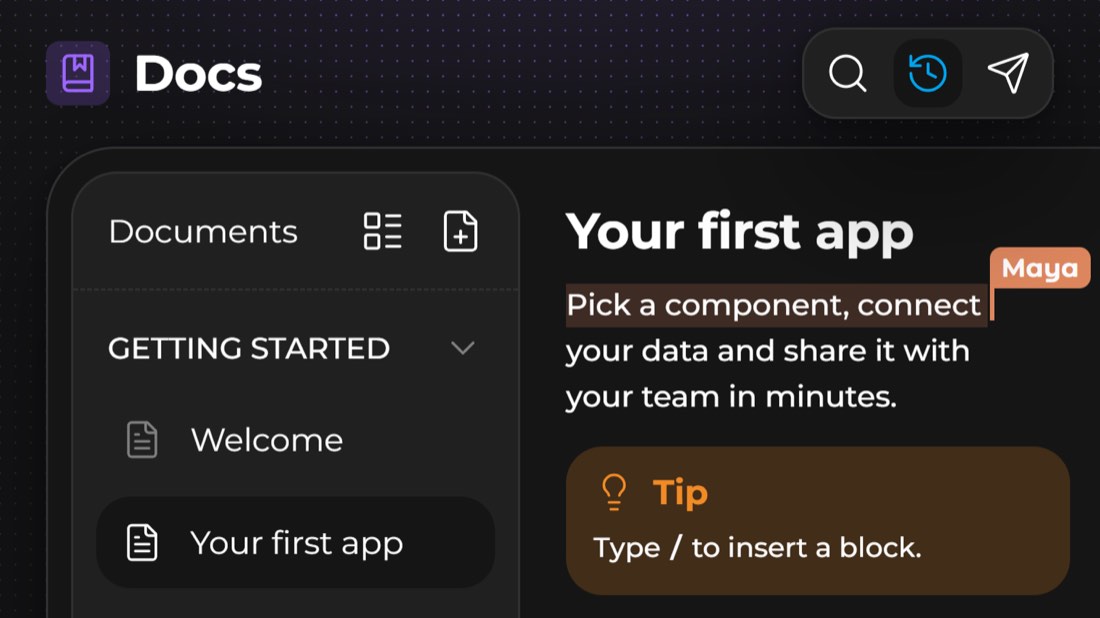
Editor and reader
Docs has two modes:
the editor, to write: the pages sidebar and the block editor;
the reader, to read: table of contents, search, dark mode, PDF download and Previous / Next navigation.
The editor's Preview button shows the docs as your readers will see them.
Page types
The sidebar's Add menu offers:
A page can hold sub-pages, as many levels deep as needed. Right-click a page: Add document, Change icon, Rename, Collapse / Expand by default, Delete.
A link to another page of the docs keeps working even if that page is renamed or moved.
With Kubme AI
Ask Kubme AI: “Write a Quick start page in my docs, with one sub-page per step.” From Claude or ChatGPT, you can also have it write the docs from your code (see The Kubme MCP server).
Documenting an API
Add › OpenAPI specification.
Give the specification's URL, or paste it (JSON or YAML, OpenAPI 3 or Swagger 2.0).
Choose the Page structure: one page per tag, or one page per operation.
Click Generate the pages.
Each operation shows its parameters, its responses and code samples (HTTP, cURL, JavaScript, Python…). Turn on Let readers send requests from the page so they can Try it right away.
When the API changes: Specification settings › Update the pages from the specification.
Customizing
Configuration:
Settings: toolbar, search, table of contents, documents panel open by default, pages collapsed by default, Let readers download a PDF, content width;
Themes: a theme from the Kubme catalog, in one click;
Palette & Typography: colors (primary, background, surfaces, text, border, success, warning, danger, info), light and dark modes, heading, body and code fonts;
Identity: name, light and dark logos, favicon, back link to your site, corner radius, text size, line height.
Translating
Configuration › Translations › Add a language (English, French, German, Spanish, Italian, Portuguese).
Open a page and switch to the language you want to write its translation. Start from the original copies the source text so you can translate it.
Readers pick their language in the reader.
Publishing
Like any component, docs can be published at a kubme.app address or on your own domain (see Kubme and custom domains), or embedded in a site (see Widgets). They can also be exported to PDF.